Roadmap → release → sprint
Roadmap plans take their dates from the releases and sprints that deliver them.
Product
enchorus keeps planning, delivery, quality, resourcing, reporting, contracts and benefits in one record, traces every piece of work from the roadmap to sign-off, and builds good practice in, so everyone sees the same picture.
See how enchorus compares with Asana, Jira, monday.com and others
See enchorus with your own projects, talk through onboarding, or ask us anything, with the people who build it.
01Traced end to end
Each link below is kept by enchorus itself, not by people copying between tools, so any question about why, who, when or how much has its answer in the record.
Roadmap plans take their dates from the releases and sprints that deliver them.
Every story belongs to a feature and every feature to an epic, in the SAFe® hierarchy.
A test run picks stories from a release or sprint; a failed check raises a defect linked to it, and a later run retests it.
A statement of work sits under its client's contract and names the features it pays for.
People are planned onto sprints by day, with their role's rates and costs.
Hours are recorded against the sprint or project and approved week by week, then locked.
Risks and issues are kept per release, project or workspace.
Minutes record decisions, and every action has an owner and is tracked.
Benefits are shared across the releases and projects that deliver them.
02One record
Planning and delivery
Roadmap, releases, sprints and client projects in one connected plan, so every date you show comes from the work itself, not from someone's update.
Explore planning and deliveryQuality
Every test traces back to a user story's acceptance criteria and forward to the defect, the fix and the retest, so sign-off rests on evidence, not opinion.
Explore qualityCollaboration
Conversations, meetings and messages live beside the work they are about, so anyone can find what was decided, by whom and why, months later.
Explore collaborationStudio
Private notes and analysis boards for the thinking that comes before a plan, shared only with the people you choose, and turned into tracked work when an idea is ready.
Explore studioTracking and documents
Tasks, risk, issue and decision registers, a RASCI matrix and a document library, each tied to the release, project or story it belongs to, so what is slipping shows before it is too late.
Explore tracking and documentsResourcing
Resource plans, away days and timesheets come from the work itself, across every team and client, so availability, hours and forecasts are always current, without spreadsheets.
Explore resourcingReporting and financial control
Delivery and financial reports, and dashboards that cascade, worked out from the plans, registers and approved hours, so the steering pack and the margin are ready whenever someone asks.
Explore reporting and financial controlCatalogue and best-practice templates
Proven scope from your catalogue and a proven plan from a template, with every date and role set before the first day, and each engagement improving the next.
Explore catalogue and best-practice templatesContracts and benefit realisation
From the contract and its statements of work to the scope they pay for and the benefits they promise, every commitment on record and every outcome proved with evidence.
Explore contracts and benefit realisationAdministration and control
Workspaces keep teams and clients apart, roles decide who can do what, AI stays off until you allow it, and every sign-in and change is on record, all run by your own administrators.
Explore administration and control03The process, built in
Board tools hand you a blank page and ask you to design the process. enchorus starts from project management practice, built in.
A Definition of Ready and a Definition of Done for each workspace, which warn, or stop the work if you choose.
Every release, sprint and project is rated green, amber or red on five fixed checks, such as scope, resources, schedule and risks, by the same rules, each with its reason.
A plan saved as a baseline is never edited or deleted, and variance in days, hours and cost is measured against it.
Testers report and developers fix, nobody approves their own timesheet, and money is seen only by the people ticked for it.
Recorded hours and approved weeks are never deleted, and every sign-in and change is on record.
Dashboards and tips name only what is slipping, with the reason, so attention goes where it is needed.
Why it works
The principles that turn scattered tools into one accountable project office.
enchorus follows how experienced project managers actually work: a roadmap tied to delivery, a backlog in the SAFe® hierarchy, sprints and releases for agile teams, client projects with milestones for stage-based work, and risk and issue registers, resource plans and timesheets around them. Each part supports a recognised practice rather than a generic list of tasks.
Good governance reviews the portfolio first and drills down by exception. The workspace dashboard rolls up the health of every release and client project; each opens its own release or project dashboard with the same measures, so a steering group and a project team look at one consistent picture. Snapshots saved as reports give each review its record.
SAFe is a registered trademark of Scaled Agile, Inc.; enchorus is not affiliated with or endorsed by it.
04Built-in guidance
cue is our built-in guidance, built without AI: plain rules that run inside your organisation's own database, so your data is never sent to an outside service or used to train anything. It watches your plans and points out what needs attention before it becomes a problem, with one short tip on the page where you can act on it.
Tips follow what each person may see and do. Hide one until tomorrow, or switch tips off in your profile.
05Insights
When you want a second opinion on a plan, choose Insights on a sprint, a release, a client project, a risk or issue register or Scope, or ask for the week's status from the Dashboard. enchorus works out every figure and date first, from the forecast and the team's pace to the hours planned and available, and cue adds what it has noticed. The AI reads only that and the items' own words, then explains what they mean and what to do next. It isn't a chat: it reviews the record in front of you.
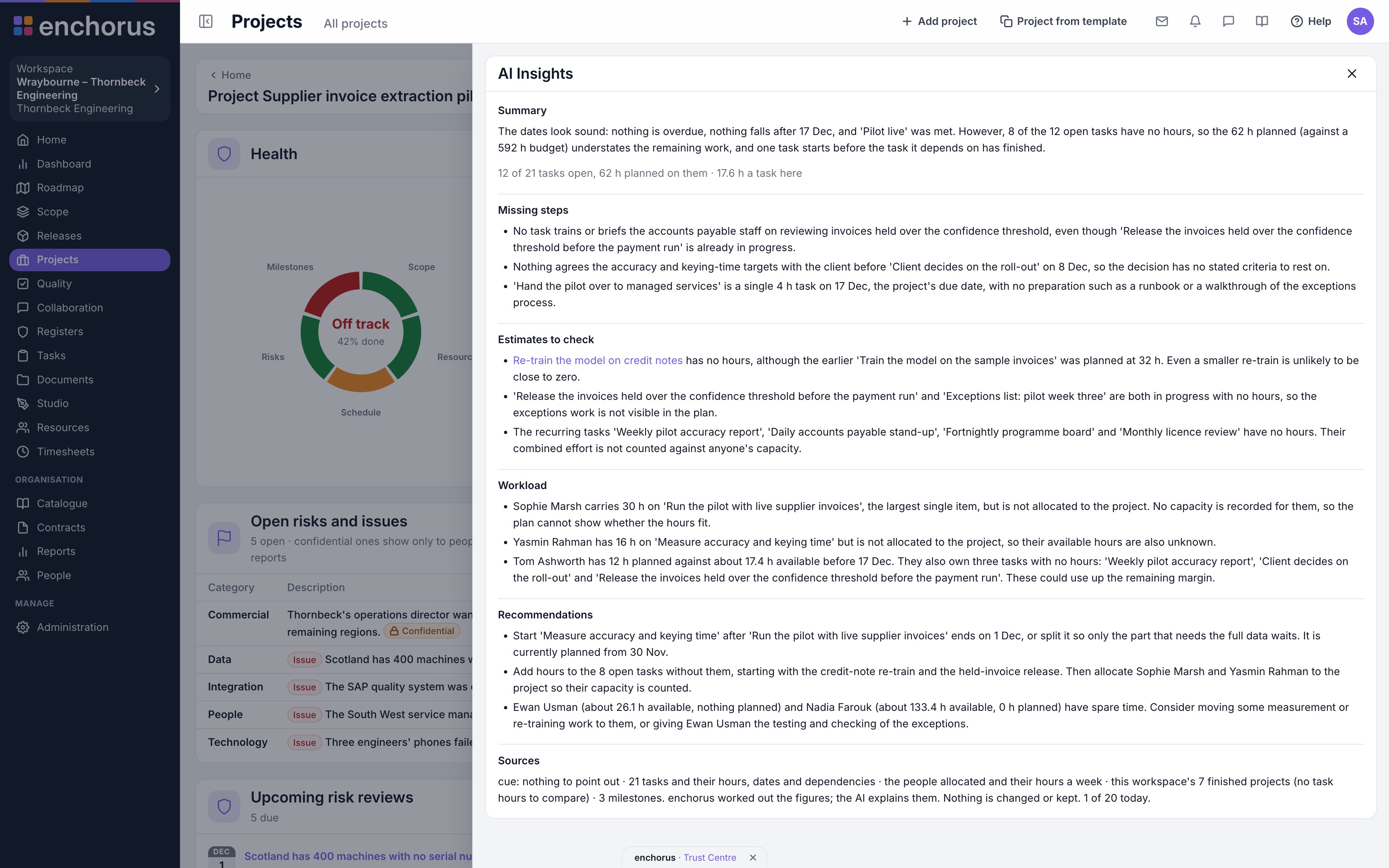
Stories at risk and why, worries nobody has recorded, and what to move out so the plan fits.
On track, at risk or probably late, from enchorus's own forecast, with the reasons and what would move the date.
Steps the work usually needs that the plan lacks, estimates to check against your finished projects, and anyone with more work than time.
Risks and issues people raised in conversations, minutes and defects, each drafted into the register's own form for you to save.
For Planners and Workspace admins, within a daily limit. An organisation administrator switches Insights on, and each workspace may keep it off. Powered by Anthropic's Claude, listed on our sub-processors page; cue stays rule-based and sends nothing anywhere.
06Faster adoption
Their tasks, approvals, what is due and what is at risk, the moment they sign in.
Clients and stakeholders follow progress without being able to change it.
Written for the people using it, one click from where they are.
Your organisation's own web address, from the first day of the trial.
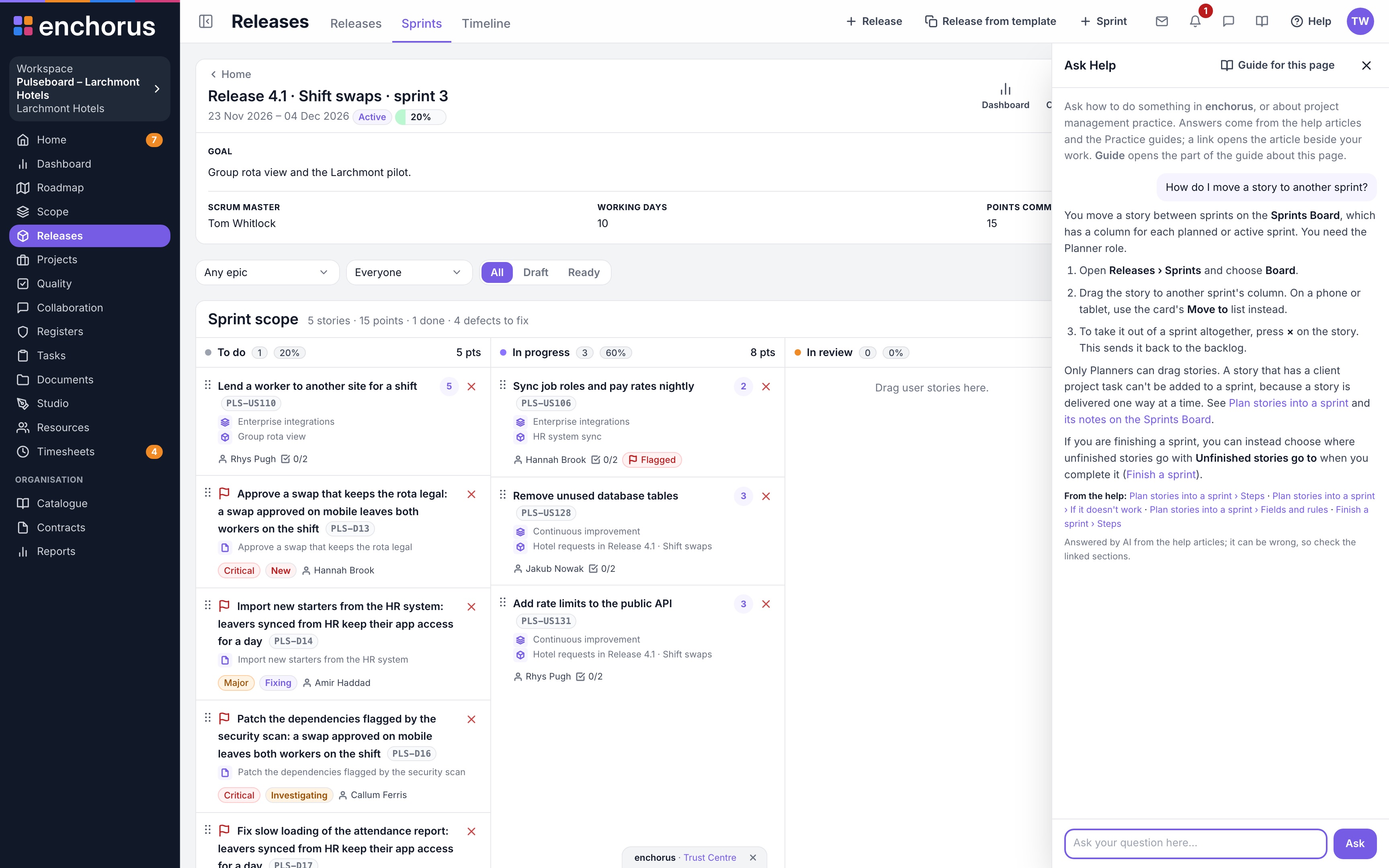
Ask Help turns the Help button into a chat that answers questions about enchorus from our own guide: what this page is for, why it works the way it does, and how to get something done. It starts with questions about the page you're on, understands follow-ups, and every answer links to the right part of the guide, opened beside your work. New team members find their feet without waiting for training or a colleague.
Powered by Anthropic's Claude, listed on our sub-processors page. cue stays rule-based and sends nothing anywhere.
Minutes from transcripts turns a Teams, Zoom or note-taker transcript into a draft summary, minutes and owned actions for the chair to check before the minutes go out. Decisions are recorded while they are fresh, and every action is listed with an owner for the chair to confirm.
Powered by Anthropic's Claude, listed on our sub-processors page, within a monthly allowance.
enchorus is a project office for teams and organisations: roadmaps, backlogs, sprints, client projects, risk and issue registers, documents, resource plans, timesheets, contracts and benefits in one record, traced end to end. It is made by Cloud Pursuit UK Ltd and has over 20 years behind it: it began as ProjectOffice.
System integrators, software and product teams, consultancies and PMOs, in-house IT and change teams, e-commerce and web studios, marketing and creative agencies, manufacturers, AI and technology start-ups, and retail, distribution and 3PL providers.
Yes. You can start a free trial without a card, with your own address.
In days. Create your organisation, invite your team and start from a template or an imported backlog; our team can help you set up your way of working if you want it.
Yes. It runs in the browser and adapts to phones and tablets, so people can check and update their work on the move. There is nothing to install.
Start a free trial in a minute, or book a demo and we will show you enchorus with your own projects.
14-day free trial · 3 users included · no card needed
Guides on planning, delivery and running a project office, what's new in enchorus, and offers for subscribers. Once in a while, never noise.