Every task in one list
Tasks from projects, stories, sprints, releases and conversations, or on their own, in one grid, board or timeline, so nothing waits in a corner of a plan nobody opens.
Product Tracking and documents
Tasks, risk, issue and decision registers, a RASCI matrix and a document library, each tied to the release, project or story it belongs to, so what is slipping shows before it is too late.
What you get
Tasks from projects, stories, sprints, releases and conversations, or on their own, in one grid, board or timeline, so nothing waits in a corner of a plan nobody opens.
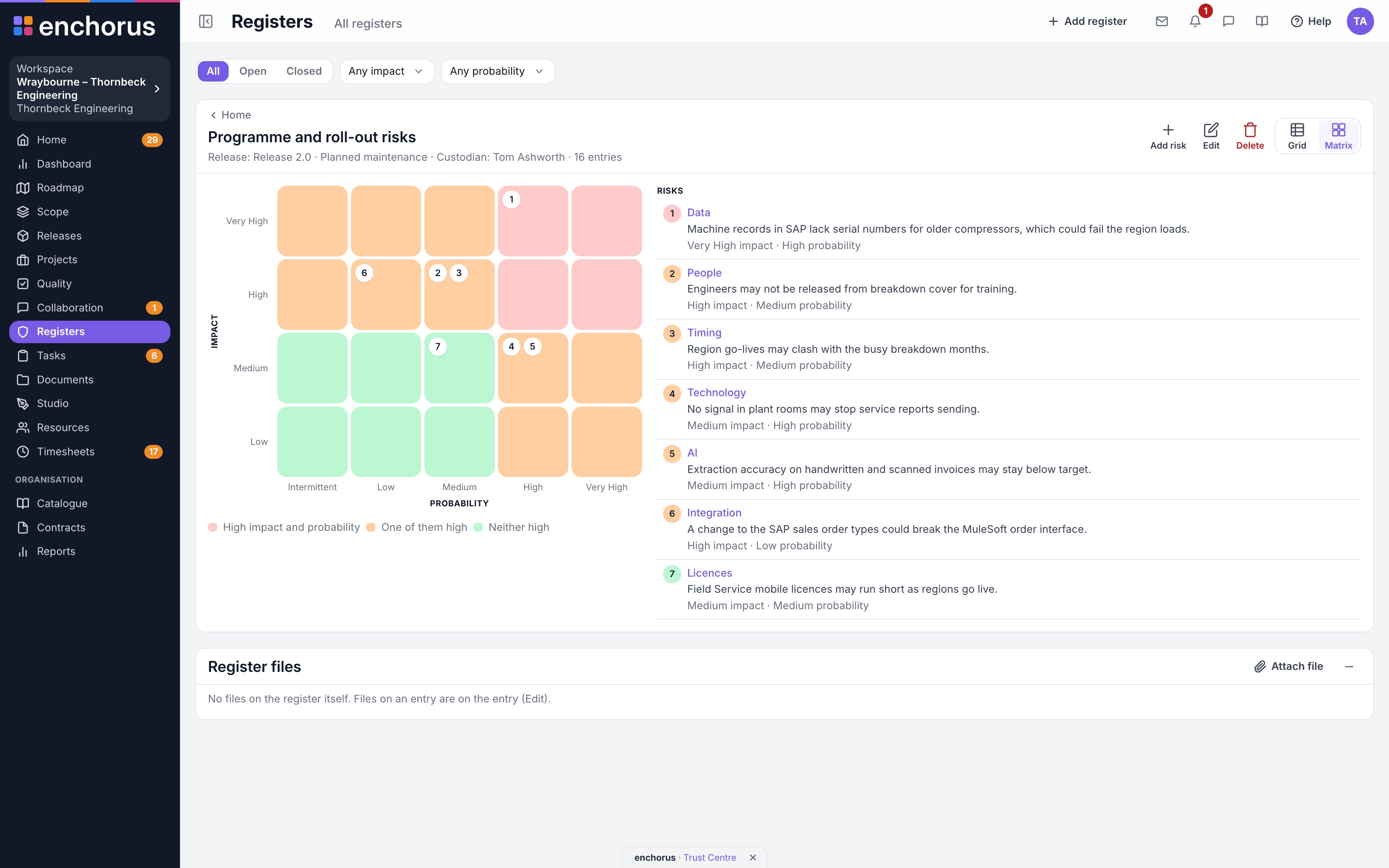
Risk and issue registers with probability, impact, cost, mitigation and a review date, and a risk matrix of every open risk, for one register or all of them together.
A decision log where each decision is proposed, agreed, rejected or superseded, with who settled it and why, kept for anyone who asks later.
A RASCI matrix for a release or project, with one Accountable for each activity and a check that names what is missing.
A change register for change requests against a statement of work, each decided on record before the scope moves.
Draft, released and retired, every upload a new version, with Readers seeing only the released one and confidential registers only for the people who need them.
How it holds together
Traced end to end
A register belongs to a release, a client project or the workspace, a change request to its statement of work, a RASCI activity to an epic, feature or milestone, and a file to the item it is about. Open any piece of work and its risks, decisions and documents are there.
One record
Risks, issues, decisions and changes are kept in registers beside the plan, with every document and attachment in the workspace found in one place.
The process, built in
Review dates on every risk, one Accountable for every activity, decisions settled by a Planner or the register's custodian, and only released documents for Readers: the controls a project office expects, already set up.
Yes. Registers for risks and issues can belong to a release, a client project or the whole workspace, with probability, impact, cost, mitigation and a review date for each entry.
Yes. A confidential register is visible only to the people given the Confidential registers extra permission in that workspace.
Every upload is a new version. A document moves from draft to released to retired, and Readers only ever see the released version.
Yes. Files can be attached to epics, features, user stories, tasks, registers and their entries, as well as kept in the document library, and the Documents area shows them all as folders.
Yes. The Tasks page brings together the tasks of client projects, epics, features, user stories, sprints, releases and conversations, with a grid and a timeline that show what is due and what is late.
Start a free trial in a minute, or book a demo and we will show you enchorus with your own projects.
14-day free trial · 3 users included · no card needed
Guides on planning, delivery and running a project office, what's new in enchorus, and offers for subscribers. Once in a while, never noise.