Status without the chasing
Project status and a RAID summary across every workspace or by client, worked out from the record, so nobody writes an update by hand.
Product Reporting and financial control
Delivery and financial reports, and dashboards that cascade, worked out from the plans, registers and approved hours, so the steering pack and the margin are ready whenever someone asks.
What you get
Project status and a RAID summary across every workspace or by client, worked out from the record, so nobody writes an update by hand.
From the portfolio to each release and client project, with the same measures at every level: progress, risks, the burndown and the forecast.
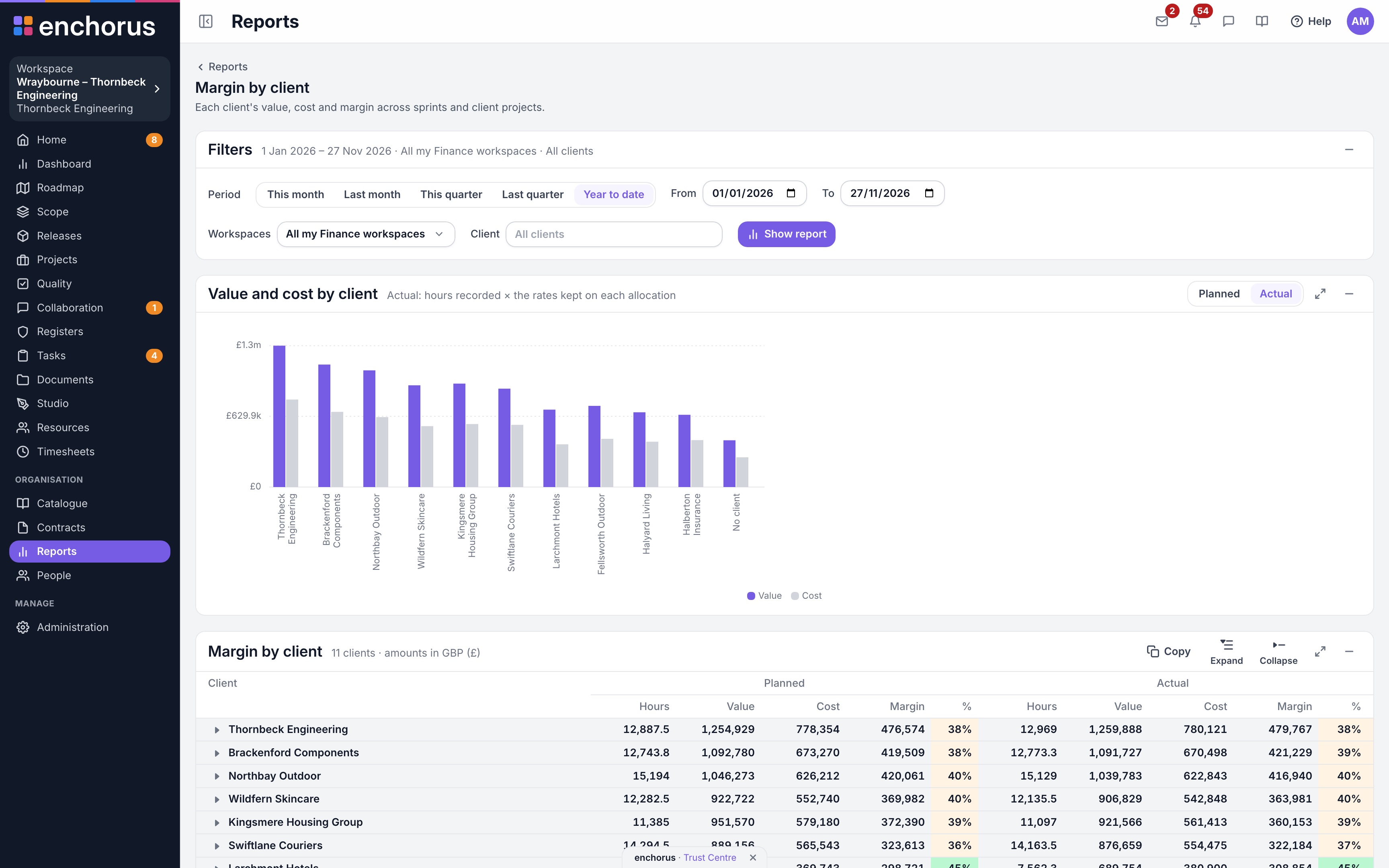
Margin by sprint and release, by client and by client project, from the hours as they are approved.
Budget vs actual, estimate at completion and agile earned value, measured against the baseline you agreed.
Utilisation, rate realisation, the cost and revenue forecast, statement of work consumption, the change log and the rate card.
Financial figures only for people given the Finance permission, in any role, currencies never added together, and every table copied into Excel in one click.
How it holds together
Traced end to end
Margin comes from approved hours on sprints and projects, progress from their stories and tasks, risk exposure from the registers. Open the portfolio, then any release or project, and every figure leads back to the work behind it.
One record
Reports are worked out from the plans, registers, baselines and timesheets the team already keeps, so they are current the moment they are opened.
The process, built in
Every release, sprint and project rated on the same five checks, each with its reason, and dashboards that name only what is slipping, so the steering meeting starts with what needs a decision.
Only people given the Finance permission, whatever their role, and only for the workspaces they have it in. It is a setting, not a charge.
Yes. Every report table has a Copy button that puts it on the clipboard ready to paste into Excel, with plain numbers and the units in the headings.
Yes. Any card of a report can fill the screen, one at a time, for a screen share.
They cascade. The workspace dashboard shows the health of every release and client project; open any of them for its own dashboard with the same measures. A PMO reviews the portfolio first and drills down only where something needs attention.
Yes. Planners save a release's or project's plan as a baseline, which is never edited, and the baseline variance, budget vs actual and earned value reports compare the work with it.
Start a free trial in a minute, or book a demo and we will show you enchorus with your own projects.
14-day free trial · 3 users included · no card needed
Guides on planning, delivery and running a project office, what's new in enchorus, and offers for subscribers. Once in a while, never noise.