Notes and sketches that stay yours
A private note for each idea, or a whiteboard to draw on with a mouse, a finger or a pencil, shared with named people when you choose, and an optional AI redraft of a note you keep or ignore.
Product Studio New
Private notes and analysis boards for the thinking that comes before a plan, shared only with the people you choose, and turned into tracked work when an idea is ready.
What you get
A private note for each idea, or a whiteboard to draw on with a mouse, a finger or a pencil, shared with named people when you choose, and an optional AI redraft of a note you keep or ignore.
Strengths, weaknesses, opportunities and threats, numbered so they can be referred to, and the five forces around rivalry, each rated Low, Medium or High.
Each item dragged to its place, by urgency and importance or by impact and capability, with a note of why it goes there, so priorities can be explained.
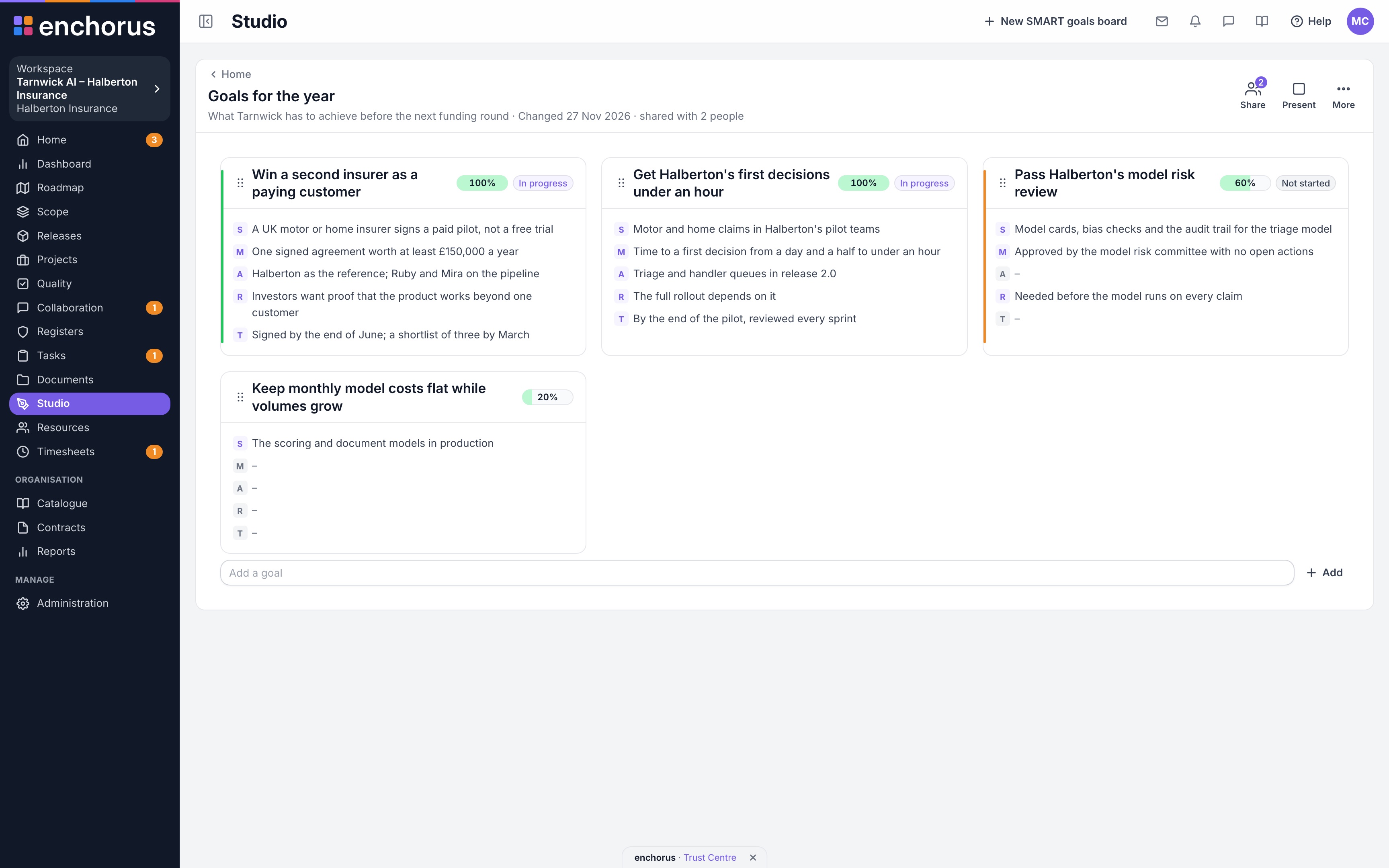
Lanes of 30, 60 and 90 days or short, medium and long term as checklists, and goals tested as Specific, Measurable, Achievable, Relevant and Time-bound.
A fishbone of possible causes on six bones, then 5 Whys from the chosen cause to the root cause, ending in actions ticked off.
Present shows a board full screen in a meeting, and Track in my Tasks turns an item into your own task when it becomes work.
How it holds together
Traced end to end
An item on any board becomes a task in your own Tasks, its title kept in step and Done ticked both ways, so an idea from a workshop can be followed into the work.
One record
Notes and boards live in the same workspace as the roadmap, scope and registers, so the thinking behind a decision stays with the team that made it.
The process, built in
SWOT, five forces, an urgent and important matrix, an impact grid, root cause analysis, a three-lane plan and SMART goals, each laid out as the technique intends, so a workshop starts with the method.
Only you, until you share it with named people in the workspace. Organisation administrators and Workspace admins can't open it either.
Yes. Present shows a board or note alone, full screen, centred and read-only, and Esc brings you back.
When you choose: Track in my Tasks makes a task only you see, with the item's title, and ticking either one done ticks the other.
Optionally. When an organisation administrator turns on AI assisted drafts, a note can be redrafted by AI, and you choose whether to keep your words or the redraft. Each use is listed on the Trust Centre.
Yes. Readers can keep their own notes, and read the boards and notes shared with them.
Start a free trial in a minute, or book a demo and we will show you enchorus with your own projects.
14-day free trial · 3 users included · no card needed
Guides on planning, delivery and running a project office, what's new in enchorus, and offers for subscribers. Once in a while, never noise.